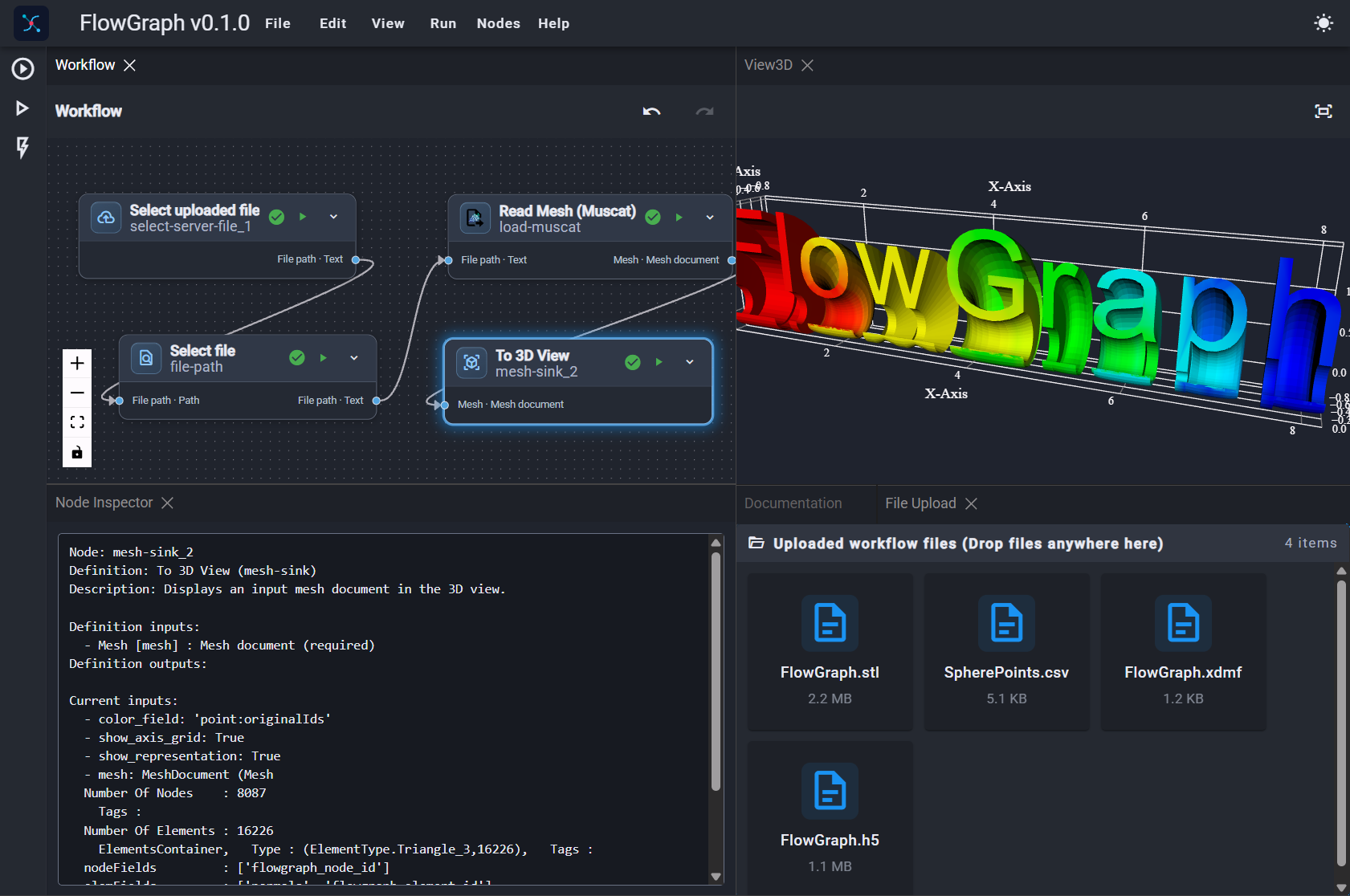
Compose visually
Search the node catalog and arrange readers, mesh operations, viewers, writers, and workflow boundaries on the canvas.
FlowGraph Web Editor
Build typed, reusable finite-element workflows visually, download the same versioned JSON used by FlowGraph, and run it locally with the Python application.
 FlowGraph Workflow Editor
path · Textmesh · Mesh documentmesh · Mesh documentA focused authoring tool
FlowGraph workflows are directed graphs of typed nodes. Connect named output ports to compatible inputs, configure parameters, and make the structure explicit before you run it.
Search the node catalog and arrange readers, mesh operations, viewers, writers, and workflow boundaries on the canvas.
Ports carry data types such as Text and Mesh document. Incompatible connections are rejected unless a registered conversion is available.
Export human-readable JSON with node definitions, parameters, canvas positions, and port-addressed connections.
FlowGraph CLI
The web editor is intentionally authoring-only. Use the local Python application to open the full workspace, inspect a saved graph, or execute it against local files.
FlowGraph uses uv for its Python environment and dependencies.
$ uv install flowgraphStart the browser-based Trame workspace on a loopback server.
$ uvx flowgraph Print published inputs, outputs, and a directed ASCII representation without opening the UI. (Use this test file)
$ uv run flowgraph inspect workflow.json$ uvx flowgraph inspect workflow.jsonInputs:
in_filename: Text (input.value)
out_filename: Text (output.value)
Outputs:
(none)
Workflow:
(title-doc)[title-doc-5] Title
(P) title - Text: 'Mesh Converter Muscat >> Muscat'
(paragraph-doc)[paragraph-doc-6] Paragraph
(P) text - Text: 'Read a mesh file with Muscat and save it with Muscat. '
(workflow-input)[input] Workflow Input
(I) value - Any
(P) name - Text: 'in_filename'
(O) value - Any
│
│ (load-muscat)[mesh_loader] Read Mesh (Muscat)
└─(I) path - Text
(O) mesh - Mesh document
│
│ (workflow-input)[output] Workflow Input
│ (I) value - Any
│ (P) name - Text: 'out_filename'
│ (O) value - Any
│ │
│ │ (write-muscat)[mesh_writer] Write Mesh (Muscat)
│ └─(I) filename - Text
└────(I) mesh - Mesh documentValues that are valid JSON are decoded automatically; ordinary paths and text remain strings.
$uvx flowgraph run \
  muscat-muscat-mesh-conversion.json \
  --input in_filename=MyFileIn.stl \
  --input out_filename=MySurfaceIn.xdmf
Change node parameters at runtime without modifying the saved workflow JSON.
$ uv run flowgraph run workflow.json \
  --override file-path.path=/data/input.stl \
--override output-path.path=/data/output.xdmfSave the workflow's public outputs as a JSON object for downstream automation.
$ uv run flowgraph run workflow.json --json-output results.json--input NAME=VALUE--override NODE-ID.PARAMETER=VALUERuntime inputs and overrides do not modify the workflow file.The flowgraph-workflow format
The browser editor and local application share the same versioned workflow format. Keep the JSON beside your engineering scripts, review it in source control, and provide different paths at runtime when moving between environments.
Return to CLI examples{
"format": "flowgraph-workflow",
"version": 2,
"nodes": [
{
"id": "load-muscat",
"definition_id": "read-mesh-muscat",
"parameters": { "path": "data/input.stl" }
}
],
"inputs": [],
"outputs": [],
"edges": []
}FlowGraph Desktop
The upcoming FlowGraph desktop app will bring workflow authoring and local execution together in a dedicated application, with the same portable workflow format used by the web editor and CLI.
Not available yet
We are still building it. There is no download available at this time.